AI Agents vs AI Workflows Architecture Step by Step Guide
ai orchestration
ai architecture
ai agents
production ai systems
ai system design
ai workflows
ai automation
llm architecture
9 min read
10 views

The Architecture Decision Most AI Startups Get Wrong
Over the last year, the AI ecosystem has exploded with tools promising to build autonomous AI agents that can run businesses, automate development, and replace complex workflows.
The demos are impressive. An agent writes emails, browses the internet, queries databases, and generates reports.
But when teams try to deploy these systems into production environments, something unexpected happens.
The system becomes unstable.
Outputs vary wildly. Costs grow unpredictably. Debugging becomes almost impossible.
This is where one of the most important architecture decisions emerges:
Should your AI system use agents or structured workflows?
Understanding the difference between AI agents vs AI workflows is critical for anyone building real AI products.
What an AI Agent Actually Is
An AI agent is an AI-driven system that can make decisions about what actions to take next.
Instead of executing predefined steps, an agent decides dynamically:
Which tools to use
Which data to retrieve
Which actions to execute
A simplified agent loop looks like this:
User Request
↓
AI Reasoning
↓
Select Tool
↓
Execute Tool
↓
Observe Result
↓
Repeat LoopFrameworks such as LangChain, AutoGPT, CrewAI, and OpenAI function calling enable this architecture.
The agent repeatedly evaluates the situation and chooses the next action.
This creates systems that appear intelligent and autonomous.
But autonomy introduces serious engineering tradeoffs.
Why AI Agents Often Break in Production
In controlled demos, AI agents perform well because the environment is simple.
In real systems, the complexity explodes.
Several issues quickly emerge.
Unpredictable Behavior
Agents rely on reasoning loops. Small prompt variations can cause completely different execution paths.
This makes outputs inconsistent.
Debugging Becomes Extremely Hard
When an agent performs 10 reasoning steps internally, diagnosing failures becomes difficult.
Logs often look like this:
Step 1: Searching documentation
Step 2: Calling API
Step 3: Generating summary
Step 4: Re-evaluating request
Step 5: Calling different APIUnderstanding why the agent changed direction is not always obvious.
Cost Escalation
Agents repeatedly call AI models during reasoning loops.
A single request may trigger:
Multiple LLM calls
Multiple tool executions
Additional reasoning passes
This multiplies token usage.
Latency Increases
Each reasoning step introduces another model call, which increases response time.
For applications with real users, this becomes a UX problem.
What AI Workflows Are
AI workflows take the opposite approach.
Instead of giving the AI full autonomy, the developer defines a structured pipeline.
The AI model performs specific tasks inside predefined steps.
Typical workflow:
Trigger Event
↓
Retrieve Data
↓
Prepare Context
↓
AI Processing
↓
Validation Layer
↓
Store ResultTools commonly used to orchestrate these pipelines include:
n8n
Temporal
Apache Airflow
LangGraph
Node.js background workers
In this model, AI becomes one component in a deterministic system.
A Common Wrong Implementation Using Agents
Developers often attempt to build entire applications using agent loops.
Example:
const agent = new Agent({
tools: [searchTool, databaseTool, emailTool]
});
const result = await agent.run(
"Research the competitor pricing and create a report"
);This appears powerful.
But several hidden problems exist:
The agent may call tools unnecessarily
Reasoning steps are opaque
Execution time becomes unpredictable
Monitoring becomes difficult
When such systems serve thousands of users, reliability drops quickly.
A Production-Ready Workflow Approach
Instead of giving the AI full autonomy, production systems usually split the task into deterministic steps.
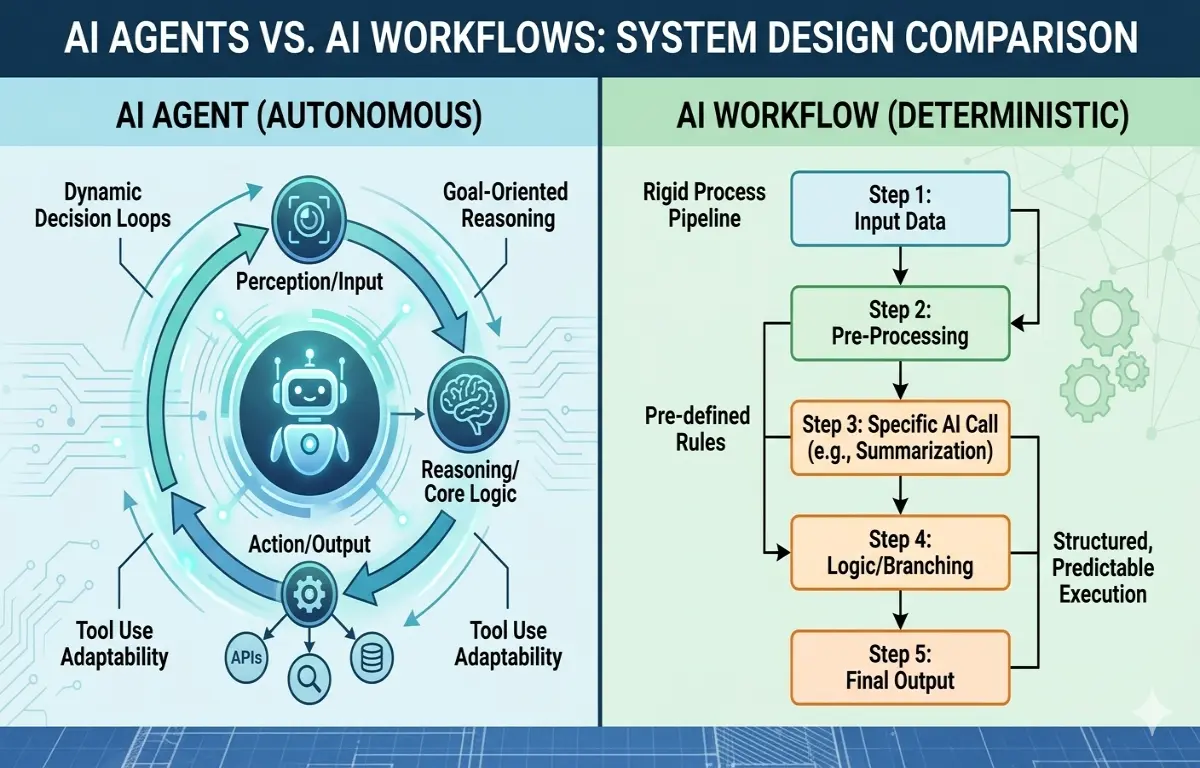
Figure 1.1: AI Agents vs AI Workflows Comparison
Example architecture:
async function generateReport(topic){
const documents = await searchDatabase(topic);
const prompt = `
Using the following documents, create a structured report.
${documents}
`;
const aiResponse = await openai.chat.completions.create({
model: "gpt-4",
temperature: 0.3,
messages: [{ role: "user", content: prompt }]
});
const validated = validateOutput(aiResponse);
await saveReport(validated);
return validated;
}In this model:
Tools are called intentionally
Prompts are structured
Outputs are validated
Failures are observable
This dramatically improves reliability.
Hybrid Architecture: The Best of Both Worlds
In modern AI systems, the most effective pattern is hybrid orchestration.
Workflows handle structured processes.
Agents are used only when autonomy adds value.
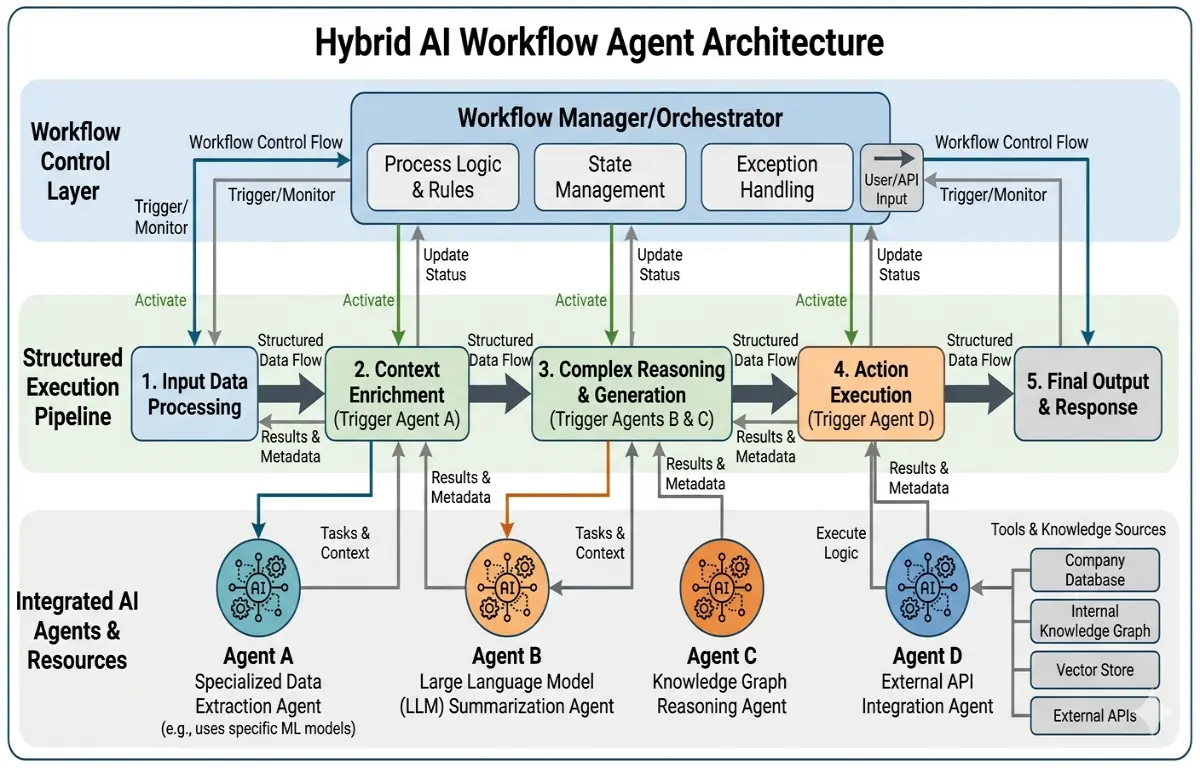
Figure 1.2: Hybrid AI Architecture
Example system:
User Request
↓
Workflow Engine
↓
Retrieve Context
↓
AI Processing
↓
Agent Module (optional reasoning)
↓
Validation
↓
Database StorageThis architecture is common in enterprise AI systems because it balances:
Reliability
Flexibility
Cost control
Companies building internal copilots or automation systems frequently adopt this approach.
Technologies Commonly Used in AI Workflow Systems
Modern AI infrastructure typically combines several components.
AI Models
OpenAI GPT models
Google Gemini
Anthropic Claude
Orchestration Tools
n8n
Temporal
LangGraph
Vector Databases
Pinecone
Weaviate
Supabase Vector
Backend Infrastructure
Node.js services
Redis queues
PostgreSQL storage
This stack enables scalable AI systems capable of handling large workloads.
Lessons Learned from Production AI Systems
After implementing multiple AI architectures, several patterns consistently appear.
Deterministic Systems Scale Better
Predictable workflows are easier to monitor and maintain.
Agents Are Best Used for Exploration Tasks
Tasks like research or brainstorming benefit from agent autonomy.
Logging Is Essential
Every prompt, response, and tool call should be logged.
Validation Layers Reduce AI Errors
Structured validation prevents hallucinated outputs from entering business systems.
Why This Architecture Decision Matters for Businesses
For startups building AI products, architecture decisions affect:
Infrastructure cost
System reliability
Product scalability
Engineering maintenance
Choosing AI agents for everything often leads to fragile systems.
Choosing structured workflows with limited autonomy produces systems that can scale.
In most real-world products, the winning strategy is not pure agents or pure workflows.
It’s carefully controlled AI orchestration.
The companies that understand this difference early will build AI products that remain stable as usage grows.
Suggested Links
If you are exploring AI system design, it’s also valuable to study how production AI workflows are built using orchestration engines like n8n and vector databases to automate business pipelines.
Developers building AI products should also examine how I built an AI-Assisted log analysis system to catch production issues before users did.
