Why Your API Is Fast in Development but Painfully Slow in Production
backend scalability
backend architecture
scalable systems
api performance
developer experience
production debugging
8 min read
2 views

I have yet to see a serious production system where someone did not say this line at least once:
“It’s fast on my machine.”
And they are not lying.
In development, APIs often feel instant. Responses come back in milliseconds. Features look stable. Everyone feels confident enough to ship. Then real users arrive. Latency spikes. Requests queue up. Timeouts start appearing. Customer complaints follow, and suddenly performance becomes a business problem, not just a technical one.
The mistake most teams make is assuming production slowness comes from “not enough server power.” So they scale vertically, add more RAM, or upgrade instances. Sometimes that buys time. Often it does nothing.
The real issue usually lives much deeper in how the API was designed, connected, and observed.
Why Development Performance Lies to You
Development environments are forgiving by nature. They hide problems instead of exposing them.
Your local setup typically has:
A single user
Clean databases
No network latency
Minimal logging
No background job pressure
Zero external dependency contention
Production is the exact opposite.
In production, your API competes for resources. It talks to third-party services. It writes logs. It triggers queues. It serves concurrent users. These conditions expose flaws that never appear locally.
This is why copying production data into staging often makes “mysterious” bugs suddenly reproducible. The system was never slow by accident. It was slow by design.
The Real Performance Killers I See Repeatedly
Most slow APIs I have fixed did not suffer from one big issue. They suffered from several small, compounding mistakes.
N+1 Queries That Look Harmless Until Scale
In development, querying related data inside a loop feels innocent. With 10 records, you do not notice it. With 10,000 records, your database starts screaming.
The dangerous part is that the API still works. It just becomes slower with every additional user.
Wrong Code (Laravel Example)
$users = User::all();
foreach ($users as $user) {
$orders = Order::where('user_id', $user->id)->get();
}This runs one query to fetch users and one query per user to fetch orders. In production, this silently becomes hundreds or thousands of queries per request.
Production-Grade Solution
$users = User::with('orders')->get();Now the database does the heavy lifting in one optimized query. Latency drops immediately, and database load becomes predictable.
Why this matters for business
Database overload is one of the fastest ways to increase infrastructure cost without improving user experience. Fixing query patterns often saves more money than scaling servers. [Why Most “Scalable” Architectures Collapse After the First 10K Users]
External API Calls Inside Critical Request Paths
Another silent killer is synchronous external calls. Payment gateways, CRM APIs, analytics services, messaging tools. They are reliable until they are not.
In development, these APIs respond instantly or are mocked. In production, they introduce unpredictable latency.
I have seen APIs blocked for seconds because a third-party service was slow, even though the core business logic was fine.
The fix is not “hope the API is fast.” The fix is architectural isolation.
Move non-critical external calls into queues. A user does not need to wait for analytics tracking or CRM syncing. Your API should respond as soon as the core transaction is complete.
Logging Everything Like It’s Free
Logging feels harmless. It is not.
In production, excessive logging can:
Block I/O
Increase response time
Fill disks
Increase cloud costs
I once traced a slow API to debug logs being written synchronously on every request. Removing those logs reduced response time by over 40 percent without touching business logic.
Logs should be intentional. Errors and critical events matter. Verbose request-level logging does not belong in high-traffic paths.
Background Jobs Competing With User Traffic
Queues are supposed to make systems faster. But when misconfigured, they do the opposite.
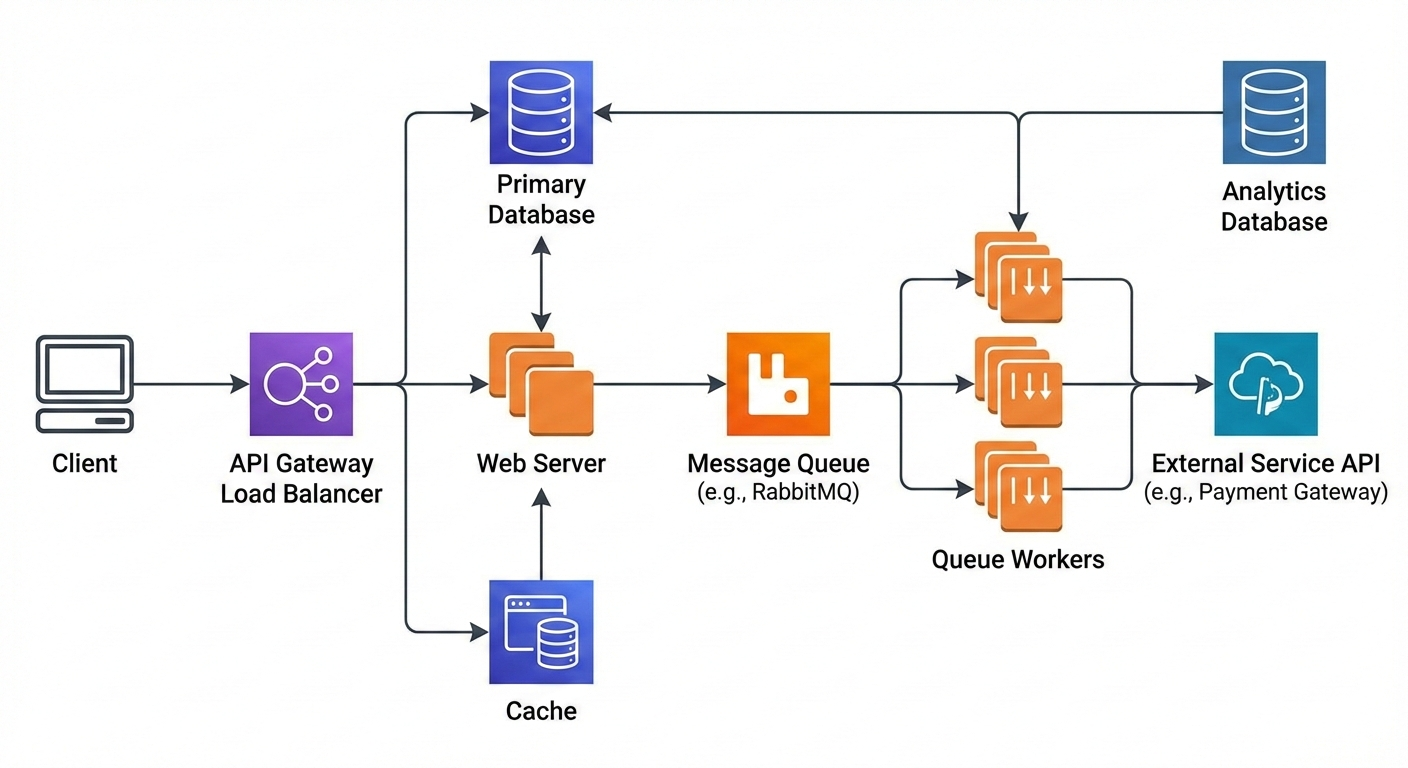
If your API and queue workers share the same resources without limits, heavy background jobs can starve live requests. In development, queues are idle. In production, they run constantly.
The fix is separation and prioritization. Different queues for different workloads. Clear concurrency limits. Observability around queue depth and execution time.
The Observability Gap Nobody Talks About
The biggest difference between fast and slow teams is not skill. It is visibility.
Most APIs are blind in production. Teams know something is slow, but they do not know why.
Before I optimize anything, I add visibility:
Request timing
Database query duration
External API latency
Queue execution time
Once you see where time is spent, performance stops being mysterious. It becomes mechanical.
This is where businesses usually have an “aha” moment. They realize performance issues were hurting conversions, user trust, and support load, not just developer morale.
How Fixing These Issues Changed Outcomes
In one system handling training bookings and payments, response times were averaging 2.8 seconds in production. Users were abandoning flows halfway through.
After:
Fixing N+1 queries
Moving external integrations to queues
Reducing synchronous logging
Isolating background workers
The same endpoints dropped to under 600 milliseconds.
Support tickets reduced. Conversion rates improved. Infrastructure costs stabilized. The codebase became calmer to work on.
Performance was not just a technical win. It directly improved revenue and team confidence.
The Mental Shift That Actually Solves This
The key mindset change is simple but uncomfortable.
Stop trusting development performance.
Design as if production will punish every shortcut.
Every API endpoint should be treated as a public contract under load. Ask:
What happens at 100x traffic?
What blocks this request?
What does not need to be synchronous?
What fails if an external service is slow?
When teams start asking these questions early, performance stops being a fire drill and becomes a feature.
More example: External API Call Done Wrong
$response = Http::post('https://external-service.com/api', $payload);
// User waits here for external systemProduction-Grade Approach
dispatch(new SyncExternalServiceJob($payload));The API responds immediately after completing core logic. The external system is updated asynchronously. Users stay happy, and failures become retryable instead of blocking.
