Why Most AI Automation Pipelines Break in Production - The AI Workflows with n8n and OpenAI Architecture That Actually Works
openai architecture
ai automation pipelines
ai orchestration
ai workflows
rag systems
ai infrastructure
n8n automation
vector databases
9 min read
1 views

The Moment AI Automation Leaves the Demo Stage
Every AI workflow automation looks impressive in a demo.
A prompt generates content.
A workflow summarizes documents.
A chatbot answers questions.
But the moment these systems enter real production environments, things start breaking.
Pipelines fail randomly.
Outputs become inconsistent.
Costs grow faster than expected.
I’ve seen this happen repeatedly when teams build AI features quickly but ignore one critical engineering principle:
AI systems need workflow architecture, not just model calls.
The difference between a fragile demo and a reliable system usually comes down to one design decision, whether the AI is embedded directly in application logic or orchestrated through structured pipelines.
This is where AI workflows with n8n become extremely powerful.
Why Most AI Automation Pipelines Fail
The most common implementation pattern looks like this:
User Request
↓
Backend API
↓
OpenAI API
↓
Return ResultThis architecture works perfectly during development.
But once real usage begins, several problems appear.
No Context Management
AI models receive limited context and cannot access historical or domain-specific information.
No Observability
Teams cannot track:
Prompt history
Model responses
Token usage
Failure points
No Retry Logic
Temporary API failures immediately break the automation pipeline.
No Output Validation
Unexpected AI responses move directly into business systems.
These issues compound as usage increases.
What looked like a simple AI feature becomes an unreliable operational component.
The Role of Workflow Orchestration
AI should rarely operate as a standalone service.
Instead, it should function inside a controlled pipeline.
Workflow orchestration platforms like n8n provide this structure.
Instead of writing AI logic directly inside application code, developers define automation pipelines composed of multiple stages.
Typical workflow stages include:
Trigger events
Data retrieval
Vector search context
Prompt construction
AI processing
Output validation
Storage or publishing
This approach transforms AI from an unpredictable service into a managed system component.
Architecture of Production AI Workflows with n8n
A typical AI automation pipeline built with n8n and OpenAI looks like this.
Event Trigger
↓
Fetch Data from Database
↓
Vector Search Context Retrieval
↓
Prompt Generation
↓
OpenAI Processing
↓
Validation Layer
↓
Store / Publish ResultEach layer solves a specific engineering problem.
Event Layer
Workflows may start from:
Scheduled jobs
API triggers
Queue messages
User actions
Context Retrieval Layer
The system retrieves relevant information using vector search.
AI Execution Layer
The AI model processes structured prompts.
Validation Layer
The system checks:
Response length
Formatting
Compliance rules
Output Layer
Results are stored in:
PostgreSQL
Redis
CMS systems
Analytics dashboards
This layered architecture makes AI systems easier to debug and scale.
A Common Wrong Implementation
Many teams start by embedding AI calls directly in their application logic.
Example:
const response = await openai.chat.completions.create({
model: "gpt-4",
messages: [
{ role: "system", content: "Write a technical article" },
{ role: "user", content: topic }
]
});
publish(response.choices[0].message.content);This looks simple but creates several long-term problems.
No monitoring
No retry logic
No contextual retrieval
No validation
No cost tracking
As automation grows, debugging becomes extremely difficult.
A Production-Ready AI Workflow Pattern
Instead of embedding the model directly in application code, a production system introduces orchestration layers.
Example workflow logic:
async function runWorkflow(topic){
const contextDocs = await vectorSearch(topic);
const prompt = `
Use the following context to generate a technical article:
${contextDocs}
Topic: ${topic}
`;
const aiResult = await openai.chat.completions.create({
model: "gpt-4",
temperature: 0.4,
messages: [{ role: "user", content: prompt }]
});
const content = aiResult.choices[0].message.content;
if(content.length < 600){
throw new Error("AI output validation failed");
}
await database.saveArticle(topic, content);
}In real systems this logic runs inside n8n pipelines, which add:
Execution logging
Retries
Monitoring
Scheduling
Alerts
These capabilities are what turn simple AI features into reliable automation infrastructure.
Why Vector Databases Matter in AI Workflows
One major improvement in modern AI systems is the use of vector databases.
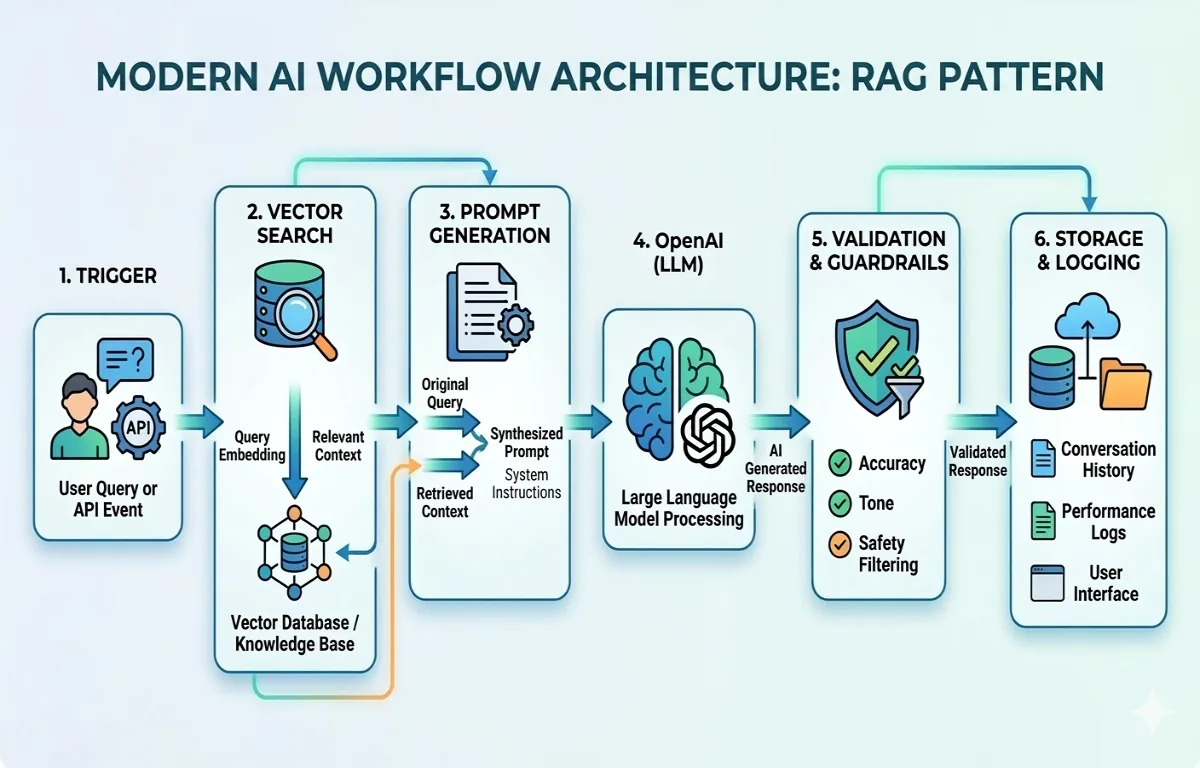
Instead of relying only on prompts, workflows retrieve relevant knowledge before calling the model.
The process looks like this:
User Request
↓
Generate Embedding
↓
Vector Search
↓
Retrieve Relevant Context
↓
Send Context to AI ModelThis pattern is known as Retrieval Augmented Generation (RAG).
Popular vector databases include:
Pinecone
Supabase Vector
Weaviate
Elasticsearch vector search
Vector search dramatically improves accuracy and reduces hallucinations.
Observability: The Hidden Requirement for AI Systems
One lesson becomes obvious after running AI automation pipelines for a while.
AI systems must be observable.
Every workflow should log:
Prompts
Model responses
Execution duration
Token usage
Failure reasons
Without observability, diagnosing AI failures becomes extremely difficult.
Workflow orchestration tools provide visibility into each pipeline step, making debugging far easier.
Where AI Workflows Create Real Business Value
When implemented correctly, AI workflows automate repetitive knowledge work across organizations.
Common use cases include:
Content generation pipelines
Customer support classification
Research automation
Data enrichment
Internal reporting
Instead of replacing teams, these systems eliminate repetitive work and allow engineers and analysts to focus on higher-level decision making.
The companies that succeed with AI rarely rely on isolated prompts.
They build automation infrastructure around AI models.
That infrastructure is what transforms AI from an experiment into a scalable operational tool.
Suggested Links
You may also want to explore the AI Agents vs AI Workflows Architecture Step by Step Guide, especially when deciding between autonomous reasoning and deterministic automation pipelines.
Developers building modern SaaS platforms should also understand why many backend architectures collapse when real usage reaches the first 10,000 users.
External Links
Frequently Asked Questions
Continue Reading

AI Development9 min read
AI Agents vs AI Workflows Architecture Step by Step Guide
Many AI products fail not because of poor models, but because of poor architecture decisions. This guide explains the real difference between AI agents vs AI workflows, and how to design scalable AI systems that work reliably in production.
Mar 12, 202610 views

AI Development8 min read
Building Production-Ready AI Workflows with n8n, OpenAI, and Vector Databases
Many teams build AI features but struggle to turn them into reliable automation systems. This guide explains how to design production AI workflows with n8n, OpenAI, and vector databases to automate real business operations efficiently.
Mar 11, 20265 views